Construction Photo Documentation Checklist
Photograph the job against the drawing. Set up the project, canvas the site, then work room and elevation by elevation: overviews, close-ups, concealed work, punch. Return visits stay on the same waypoints. The PDF is how you hand the trail off.
Walk the job in order
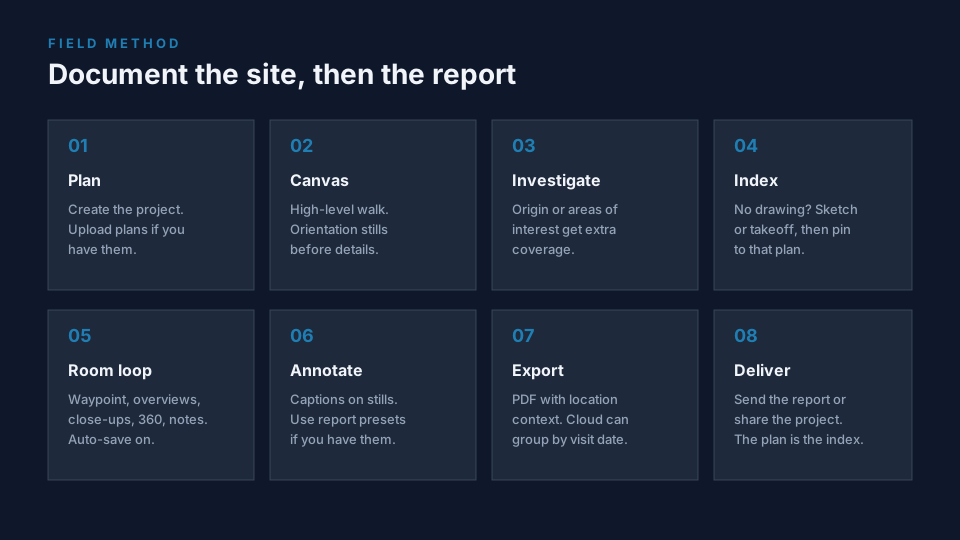
- Set up the project. Create the job in FotoLedger. Upload the floor plan, elevations, or site map. Drop spec sheets or RFIs you will need in the field onto the waypoints you expect to open.
- Canvas. Site overview stills: access, staging, elevations. Then go inside.
- Existing conditions and areas of interest. Pre-existing damage, adjacent finishes, and any opening that will be covered this week.
- No drawing? Sketch or takeoff the floor, import it, and pin to that. Waiting for CAD is how photos end up in the camera roll.
- Room / elevation / unit loop. Place a waypoint. Cross-corner overviews, then close-ups on the work. Concealed and rough-in photos at the pin that matches the cavity, not a nearby room name. Optional 360 still for a whole room or corridor. Auto-save on. Transfer 360 JPEGs from the camera app before you leave the area.
- Annotate stills. Punch notes and captions at the pin. Use report presets if your account already has them.
- Export. Location-indexed PDF. Cloud: one visit, or all dates historical (photos grouped by capture date at each waypoint). Not a before/after slider.
- Deliver. Owner package, punch walk, or consultant file. Same viewpoints on later visits go on the same pins.
What to photograph (by phase)
Before work
- Existing conditions of rooms and elevations that will be touched.
- Adjacent finishes you are protecting.
- Pre-existing damage that is not in scope.
Progress and concealed
- Same viewpoint across visits when the work is sequential (habit, not auto-matching).
- Openings before they close: cavities, substrates, buried utilities.
- MEP rough-in by room and elevation before insulation or drywall.
Punch, damage, closeout
- Issue photos at the exact wall or assembly, with a short note.
- Punch by room so closeout is a walk.
- Completed work from the same pins used earlier when possible.
Cloud historical reports group photos by capture date at each waypoint. Use that when a reviewer needs the whole job over time. Use a single-date export when they only need Tuesday’s walk.
Common mistakes
- Photographing the work and never marking the room on the plan.
- One album for the whole day. Week folders lose elevation and unit.
- Skipping concealed work because it will be covered tomorrow.
- Parking a 360 of the whole floor on one pin. One sphere per room or zone.
Product: construction photo documentation. 360 stills: 360 photo documentation. General walk: field photo documentation checklist.